
AI document processing for invoices and purchase orders
An invoice can look straightforward until a supplier changes its layout or uses a different unit of measure. We build document workflows that capture the fields your business needs and send uncertain or conflicting values to a person.
Discuss a document workflow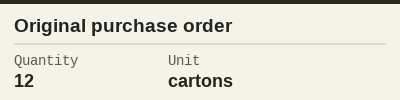
From an inbox to a checked record
Collect the email or file, identify the document type, extract the relevant fields and compare them with your records. For a purchase order, that might mean a customer reference, SKU, quantity and delivery date. Keep the source visible so the reviewer can inspect a mismatch.
Purchase order processingReview path
- Source
- Open the original file or email.
- Extract
- Identify the order reference, item, quantity and unit.
- Review
- Compare the fields with the existing record.
How do we judge accuracy?
Review each important field against a labelled sample. An accurate supplier name cannot make up for an incorrect quantity. Track the proportion of documents accepted without changes, correction time and the reasons reviewers intervene.
Where does the approved result go?
We can connect approved data to your ERP, finance system or order queue. Agree duplicate handling and approval rights before switching on write access. If people still need to run the queue, our managed operations service can cover that work.
Systems integrationHow would the workflow handle an amended order?
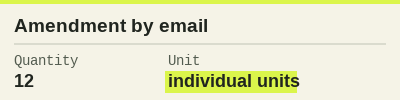
Suppose the first PDF orders twelve cartons and a later email changes one line to twelve individual units. Capture the customer reference, document revision, unit and item code separately. Compare them with the earlier record and show the changed fields beside the source. A reviewer can then approve an amendment to the existing order and avoid creating a second one.
| Field | Original | Revised |
|---|---|---|
| Quantity | 12 | 12 |
| Unit | Cartons | Individual units |
Reviewer approves the change to the existing order.
What should be in a document trial?
Include clear digital PDFs, rotated scans, handwritten corrections, multi-page tables and documents from unfamiliar suppliers. Use redacted examples that preserve the layout and the relationships between fields. Record which files are difficult to read and which are easy to read but ambiguous in meaning. A sharper scan can solve the first problem. A catalogue lookup or a question to the supplier may be needed for the second.
AI workflow automationTwo questions for the trial
- Can we read it?
- Check rotated scans, handwriting and multi-page tables.
- Do we know what it means?
- Check ambiguous units against the catalogue or ask the supplier.